
Author: LINCC Frameworks team Last updated: February 10, 2025
nested-pandas/nested-dask Demonstration#
This notebook provides a broad overview of the design and functionality of the nested-pandas and nested-dask packages, which we commonly refer to both in one as “nested”. The outline for the demo is as follows:
nested-pandasOverviewNestedFrame Interface
Internals
Performance
Introduction to
nested-dasknested-daskEclipsing Binary Showcase
nested-pandas Overview#
[1]:
# To install the needed packages for this demo, run this cell
%pip install nested_dask light_curve astropy matplotlib --quiet

# pip install --only-binary=light-curve light-curve for legacy Mac OS versions
Note: you may need to restart the kernel to use updated packages.
[1]:
import nested_pandas as npd
import pandas as pd
import numpy as np
import nested_dask as nd
import light_curve as licu
import matplotlib.pyplot as plt

from astropy.timeseries import LombScargleMultiband
The NestedFrame Interface#
The core idea of nested-pandas is the ability to “nest” DataFrames within DataFrames. Below, we load some Object and Source data available in parquet format using nested-pandas:
[22]:
# Read parquet from the native Pandas interface is available, just as the rest of the Pandas API
object_df = npd.read_parquet("objects.parquet")
source_df = npd.read_parquet("ztf_sources.parquet")

# Add a "ztf_sources" column of all tied sources to each object
object_nf = object_df.add_nested(source_df, "ztf_sources")
object_nf
[22]:
| ra | dec | ztf_sources | |||||||
|---|---|---|---|---|---|---|---|---|---|
| 0 | 17.447868 | 35.547046 |
1000 rows × 3 columns |
||||||
| 1 | 1.020437 | 4.353613 |
1000 rows × 3 columns |
||||||
| 2 | 3.695975 | 31.130105 |
1000 rows × 3 columns |
||||||
| 3 | 13.242558 | 6.099142 |
1000 rows × 3 columns |
||||||
| 4 | 2.744142 | 48.444456 |
1000 rows × 3 columns |
||||||
| ... | ... | ... | ... |
Our DataFrame (or “NestedFrame” for nested-pandas) now has a new column which contains the full contents of our source table. Every row now has a DataFrame of nested source information available to it. For example, let’s look at the first row:
[3]:
# The dataframe has all ztf_source rows for object 0
object_nf.loc[0]["ztf_sources"]
[3]:
| mjd | flux | band | |
|---|---|---|---|
| 0 | 8.420511 | 259.454128 | r |
| 1 | 5.327694 | 217.656239 | r |
| 2 | 9.252944 | 223.816007 | g |
| 3 | 12.441739 | 208.315431 | r |
| 4 | 9.949815 | 211.904192 | g |
| ... | ... | ... | ... |
| 995 | 8.040372 | 256.644230 | g |
| 996 | 6.575870 | 98.900117 | g |
| 997 | 12.866500 | 173.803123 | g |
| 998 | 14.993332 | 23.661618 | g |
| 999 | 12.126280 | 5.207718 | r |
1000 rows × 3 columns
As an extension of pandas, the full pandas interface is available to nested-pandas users. The API has been built out to support handling of nested columns, with a few examples shown next:
Applying Operations Directly to Nested Data#
[4]:
# nested_layer.column syntax allows access to sub-queries
object_nf_g = object_nf.query("ztf_sources.band == 'g'")
object_nf_g
[4]:
| ra | dec | ztf_sources | |||||||
|---|---|---|---|---|---|---|---|---|---|
| 0 | 17.447868 | 35.547046 |
493 rows × 3 columns |
||||||
| 1 | 1.020437 | 4.353613 |
504 rows × 3 columns |
||||||
| 2 | 3.695975 | 31.130105 |
504 rows × 3 columns |
||||||
| 3 | 13.242558 | 6.099142 |
499 rows × 3 columns |
||||||
| 4 | 2.744142 | 48.444456 |
499 rows × 3 columns |
||||||
| ... | ... | ... | ... |
[5]:
# The dataframes nested in "ztf_sources" now only contain g-band observations
object_nf_g.loc[0]["ztf_sources"]
[5]:
| mjd | flux | band | |
|---|---|---|---|
| 0 | 9.252944 | 223.816007 | g |
| 1 | 9.949815 | 211.904192 | g |
| 2 | 13.244645 | 84.233653 | g |
| 3 | 15.276809 | 165.979942 | g |
| 4 | 4.083187 | 25.302763 | g |
| ... | ... | ... | ... |
| 488 | 5.437578 | 91.500606 | g |
| 489 | 8.040372 | 256.644230 | g |
| 490 | 6.575870 | 98.900117 | g |
| 491 | 12.866500 | 173.803123 | g |
| 492 | 14.993332 | 23.661618 | g |
493 rows × 3 columns
Run Custom User Functions with reduce#
reduce is a flexible function that applys a function to each row of the NestedFrame (similar to pandas apply), with the additional capability of using nested columns in those function calls.
[6]:
# Define a custom user function
def my_mean_func(fluxes):
    """A custom function to calculate the mean flux"""
    return {"mean_flux": np.mean(fluxes)}

# Find the mean g-band flux for each object
object_nf_g.reduce(my_mean_func, "ztf_sources.flux")
[6]:
| mean_flux | |
|---|---|
| 0 | 146.386013 |
| 1 | 149.530865 |
| 2 | 158.365247 |
| 3 | 150.590805 |
| 4 | 154.176187 |
| ... | ... |
| 995 | 148.844946 |
| 996 | 149.470083 |
| 997 | 153.178028 |
| 998 | 150.725953 |
| 999 | 147.935841 |
1000 rows × 1 columns
Writing functions for reduce is easy, as reduce packages input data in common python data structures:
[7]:
# Our function receives base column values as single values
# and nested column values as a numpy array of values
def show_types(base_column, nested_column):
    """A custom function to calculate the mean flux"""
    return {"normal_column_type": type(base_column),
           "nested_column_type": type(nested_column)}

object_nf_g.reduce(show_types, "ra", "ztf_sources.mjd").head(5)
[7]:
| normal_column_type | nested_column_type | |
|---|---|---|
| 0 | <class 'float'> | <class 'numpy.ndarray'> |
| 1 | <class 'float'> | <class 'numpy.ndarray'> |
| 2 | <class 'float'> | <class 'numpy.ndarray'> |
| 3 | <class 'float'> | <class 'numpy.ndarray'> |
| 4 | <class 'float'> | <class 'numpy.ndarray'> |
5 rows × 2 columns
Internals: Powering Efficient Data Analysis with pyarrow#
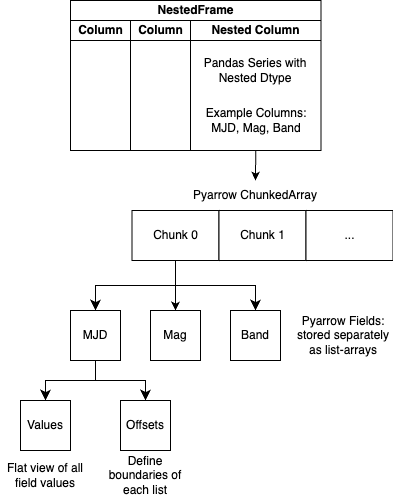
“Dataframes within Dataframes” is a useful hueristic for understanding the API/workings of a NestedFrame. However, the actual storage representation leverages pyarrow (a package that contains a set of technologies that enable data systems to efficiently store, process, and move data) and materializes the nested dataframes as a view of the data. The following diagram details the actual storage representation of nested-pandas:
Performance Impact of nested-pandas#
The design of nested-pandas yields significant speedups over using pandas native workflows in many cases. Below is a brief example workflow comparison between pandas and nested-pandas, where this example workflow calculates the amplitude of fluxes after a few filtering steps.
pandas#
[8]:
%%timeit

# Read data
object_df = pd.read_parquet("objects.parquet")
source_df = pd.read_parquet("ztf_sources.parquet")

# Filter on object
filtered_object = object_df.query("ra > 10.0")
#sync object to source --removes any index values of source not found in object
filtered_source = filtered_object[[]].join(source_df, how="left")

# Count number of observations per photometric band and add it to the object table
band_counts = source_df.groupby(level=0).apply(lambda x:
                                               x[["band"]].value_counts().reset_index()).pivot_table(values="count",
                                                                                                     index="index",
                                                                                                     columns="band",
                                                                                                     aggfunc="sum")
filtered_object = filtered_object.join(band_counts[["g","r"]])

# Filter on our nobs
filtered_object = filtered_object.query("g > 520")
filtered_source = filtered_object[[]].join(source_df, how="left")

# Calculate Amplitude
amplitude = licu.Amplitude()
filtered_source.groupby(level=0).apply(lambda x: amplitude(np.array(x.mjd), np.array(x.flux)))
492 ms ± 3.87 ms per loop (mean ± std. dev. of 7 runs, 1 loop each)
nested-pandas#
[9]:
%%timeit

#Read in parquet data
#nesting sources into objects
nf = npd.read_parquet(data="objects.parquet",
                  to_pack={"ztf_sources": "ztf_sources.parquet"})

# Filter on object
nf = nf.query("ra > 10.0")

# Count number of observations per photometric band and add it as a column
nf = npd.utils.count_nested(nf, "ztf_sources", by="band", join=True)

# Filter on our nobs
nf = nf.query("n_ztf_sources_g > 520")

# Calculate Amplitude
amplitude = licu.Amplitude()
nf.reduce(amplitude, "ztf_sources.mjd", "ztf_sources.flux")
227 ms ± 4.74 ms per loop (mean ± std. dev. of 7 runs, 1 loop each)
In this example, nested-pandas has improved the speed of computation by ~2x and also reduced the overall code footprint of the workflow. As a relatively simple workflow, this is a conservative example of the performance gains of nested-pandas as in more complex workflows we expect to see more and more joins and groupbys in a native pandas workflow that are avoided in nested-pandas.
Addressing Scale: nested-dask#
The row-by-row optimizations introduced in nested-pandas are vital to efficiently work at scale. However, just as pandas is largely limited to in-memory datasets, so is nested-pandas.
dask is a package that equips pandas with the ability to work at scale, by:
Providing built-in parallelization and larger-than-memory computation of workflows
Introducing “lazy” computation, where operations are tracked and run only when data is needed/requested
Providing dashboarding utility to help users monitor/debug their active workflows
This motivates the LINCC-Frameworks package, nested-dask, to bring the efficiency gains of nested-pandas to the scale of Rubin.
nested-dask Showcase: Eclipsing Binary Search in the PLAsTiCC Dataset#
The API of nested-dask follows the API of Nested-Pandas closely, and as such we’ll show nested-dask
The goal of the workflow is to identify a subset of eclipsing binary candidates within the dataset.
Photometric LSST Astronomical Time-Series Classification Challenge (PLAsTiCC)
3,492,890 Objects
453,653,104 Sources
[10]:
# Setting up a Dask Client allows us to define the used compute resources
from dask.distributed import Client
client = Client(n_workers=4,
                dashboard_address=':39876')

# Not available externally
DATA_DIR = "/Users/dbranton/lincc/timeseries/data/plasticc/parquet"

client
[10]:
Client
Client-93b5aef0-e978-11ef-a6bc-62679ec975a9
| Connection method: Cluster object | Cluster type: distributed.LocalCluster |
| Dashboard: http://127.0.0.1:39876/status |
Cluster Info
LocalCluster
0501abeb
| Dashboard: http://127.0.0.1:39876/status | Workers: 4 |
| Total threads: 12 | Total memory: 32.00 GiB |
| Status: running | Using processes: True |
Scheduler Info
Scheduler
Scheduler-d76311e4-6ab5-481f-ab82-18d5c5ced2cd
| Comm: tcp://127.0.0.1:51402 | Workers: 4 |
| Dashboard: http://127.0.0.1:39876/status | Total threads: 12 |
| Started: Just now | Total memory: 32.00 GiB |
Workers
Worker: 0
| Comm: tcp://127.0.0.1:51413 | Total threads: 3 |
| Dashboard: http://127.0.0.1:51414/status | Memory: 8.00 GiB |
| Nanny: tcp://127.0.0.1:51405 | |
| Local directory: /var/folders/lc/dws63_cs5gz5mf8s869hjpx40000gn/T/dask-scratch-space/worker-z1j2dur9 | |
Worker: 1
| Comm: tcp://127.0.0.1:51416 | Total threads: 3 |
| Dashboard: http://127.0.0.1:51417/status | Memory: 8.00 GiB |
| Nanny: tcp://127.0.0.1:51407 | |
| Local directory: /var/folders/lc/dws63_cs5gz5mf8s869hjpx40000gn/T/dask-scratch-space/worker-siq69g1f | |
Worker: 2
| Comm: tcp://127.0.0.1:51419 | Total threads: 3 |
| Dashboard: http://127.0.0.1:51420/status | Memory: 8.00 GiB |
| Nanny: tcp://127.0.0.1:51409 | |
| Local directory: /var/folders/lc/dws63_cs5gz5mf8s869hjpx40000gn/T/dask-scratch-space/worker-qvayg4hg | |
Worker: 3
| Comm: tcp://127.0.0.1:51422 | Total threads: 3 |
| Dashboard: http://127.0.0.1:51423/status | Memory: 8.00 GiB |
| Nanny: tcp://127.0.0.1:51411 | |
| Local directory: /var/folders/lc/dws63_cs5gz5mf8s869hjpx40000gn/T/dask-scratch-space/worker-k8apqymq | |
[11]:
%%time
# Load in Plasticc data
object_ndf = nd.read_parquet(DATA_DIR+"/object/*.parquet",
                         dtype_backend="pyarrow",
                         index="object_id",
                         calculate_divisions=True,
                         columns=["ra", "decl","hostgal_photoz"])
source_ndf = nd.read_parquet(DATA_DIR+"/source/*.parquet",
                         dtype_backend="pyarrow",
                         index="object_id",
                         calculate_divisions=True,)

# Nesting Sources in Object
objsor_ndf = object_ndf.add_nested(source_ndf, "source")
CPU times: user 43.7 ms, sys: 15.9 ms, total: 59.6 ms
Wall time: 65.1 ms
[12]:
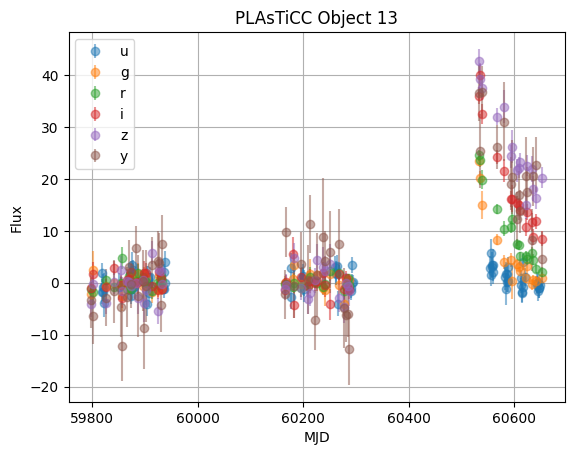
# Grab the source dataframe for the first object
obj = objsor_ndf.head(1).iloc[0]
lc = obj.source

for band in np.unique(lc.passband):
    band_mask = lc.passband == band
    band_labels = ["u","g","r","i","z","y"]
    plt.errorbar(lc.mjd[band_mask],
                 lc.flux[band_mask],
                 yerr=lc.flux_err[band_mask],
                 fmt='o', alpha=0.5,
                 label=band_labels[band])

plt.title(f"PLAsTiCC Object {obj.name}")
plt.ylabel("Flux")
plt.xlabel("MJD")
plt.grid()
plt.legend()
[12]:
<matplotlib.legend.Legend at 0x176a93b00>
First, let’s select only Galactic objects, by cutting on redshift:
[13]:
%%time
objsor_ndf = objsor_ndf.query("hostgal_photoz < 0.001")
CPU times: user 12.5 ms, sys: 2.97 ms, total: 15.5 ms
Wall time: 18.6 ms
Second, let’s select persistent sources, by cutting on the duration of the light curve:
[14]:
%%time
def calc_ptp(time, detected):
    try:
        return {"duration": np.ptp(time[np.asarray(detected, dtype=bool)])}
    except ValueError:
        return {"duration": 0}

duration = objsor_ndf.reduce(calc_ptp, 'source.mjd', 'source.detected_bool',
                         meta={"duration":"float"})
# Filter by the calculated duration
objsor_ndf = objsor_ndf.assign(duration=duration["duration"])
objsor_ndf = objsor_ndf.query("duration > 366")
CPU times: user 22.1 ms, sys: 3.59 ms, total: 25.7 ms
Wall time: 27.2 ms
Next, we use Otsu’s method to split light curves into two groups: one with high flux, and one with low flux. Eclipsing binaries should have lower flux group smaller than the higher flux group, but having larger variability. For simplicity, we only calculate these features for the i (3) band.
[15]:
%%time

def otsu_fmt(*args, **kwargs):
    otsu = licu.OtsuSplit()
    res = otsu(*args, **kwargs)
    return {'otsu_mean_diff': res[0],
           'otsu_std_lower': res[1],
           'otsu_std_upper': res[2],
            'otsu_lower_to_all_ratio': res[3]}

objsor_ndf_3 = objsor_ndf.query("source.passband == 3")
otsu_features = objsor_ndf_3.reduce(otsu_fmt, 'source.mjd', 'source.flux',
                               meta={'otsu_mean_diff': float,
                                     'otsu_std_lower': float,
                                     'otsu_std_upper': float,
                                     'otsu_lower_to_all_ratio': float,})
# Assign Columns
objsor_ndf = objsor_ndf.assign(
    otsu_lower_to_all_ratio=otsu_features['otsu_lower_to_all_ratio'],
    otsu_std_lower=otsu_features['otsu_std_lower'],
    otsu_std_upper=otsu_features['otsu_std_upper'],
)
# Filter by Otsu Features
objsor_ndf = objsor_ndf.query(
    "otsu_lower_to_all_ratio < 0.1 and otsu_std_lower > otsu_std_upper",
)
CPU times: user 25.3 ms, sys: 3.57 ms, total: 28.9 ms
Wall time: 27.5 ms
And finally, we can call compute to kick off the computation:
[16]:
%%time
objsor_df = objsor_ndf.compute()
CPU times: user 2.62 s, sys: 649 ms, total: 3.27 s
Wall time: 9.44 s
Note: Our previous LINCC-Frameworks project, Timeseries Analysis & Processing Engine (TAPE), completed this workflow in ~45 seconds using the same cluster setup. TAPE serves as a rough expectation of native
pandasperformance, as it utilized thepandas/daskdataframe API for its operations
[17]:
objsor_df.sort_values(by="duration")
[17]:
| ra | decl | hostgal_photoz | source | duration | otsu_lower_to_all_ratio | otsu_std_lower | otsu_std_upper | |||||||||||
|---|---|---|---|---|---|---|---|---|---|---|---|---|---|---|---|---|---|---|
| object_id | ||||||||||||||||||
| 5018697 | 89.278100 | -55.299400 | 0.000000 |
145 rows × 5 columns |
366.026900 | 0.090909 | 20.334780 | 11.308998 | ||||||||||
| 107162588 | 103.183600 | -27.279600 | 0.000000 |
146 rows × 5 columns |
366.945900 | 0.083333 | 59.450195 | 13.847480 | ||||||||||
| 81231667 | 79.804700 | -36.609200 | 0.000000 |
138 rows × 5 columns |
367.078500 | 0.086957 | 18.588678 | 12.536847 | ||||||||||
| 70340192 | 33.966300 | -51.255800 | 0.000000 |
137 rows × 5 columns |
367.819400 | 0.086957 | 15.041311 | 7.034880 | ||||||||||
| 19873025 | 318.164100 | -19.629600 | 0.000000 |
128 rows × 5 columns |
368.225900 | 0.090909 | 61.010877 | 5.875888 | ||||||||||
| ... | ... | ... | ... | ... | ... | ... |
[18]:
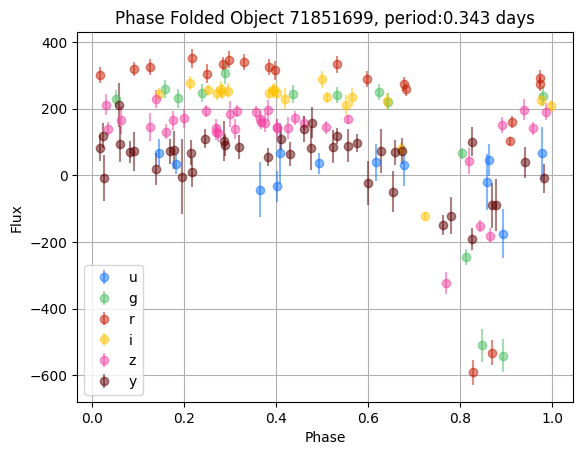
# Grab the source dataframe for the first object
obj = objsor_df.loc[71851699] #71851699
lc = obj.source

model = LombScargleMultiband(lc.mjd, lc.flux, lc.passband, lc.flux_err, nterms_base=2, nterms_band=1)
frequency, power = model.autopower(method='flexible', nyquist_factor=50)
freq_maxpower = frequency[np.argmax(power)]
t_phase = np.linspace(0, 1/freq_maxpower, 100)
y_fit = model.model(t_phase, freq_maxpower)

COLORS = {'u': '#0c71ff', 'g': '#49be61', 'r': '#c61c00',
          'i': '#ffc200', 'z': '#f341a2', 'y': '#5d0000'}

#plt.plot(frequency, power)

for band in np.unique(lc.passband):
    band_mask = lc.passband == band
    band_labels = ["u","g","r","i","z","y"]
    #plt.plot(t_phase/(1/freq_maxpower), y_fit[band], '-', color=COLORS[band_labels[band]])
    plt.errorbar(lc.mjd[band_mask]%(1/freq_maxpower)/(1/freq_maxpower),
                 lc.flux[band_mask],
                 yerr=lc.flux_err[band_mask],
                 fmt='o', alpha=0.5,
                 label=band_labels[band],
                 color=COLORS[band_labels[band]])

plt.title(f"Phase Folded Object {obj.name}, period:{np.round(1/freq_maxpower,3)} days")
plt.ylabel("Flux")
plt.xlabel("Phase")
plt.grid()
plt.legend()
[18]:
<matplotlib.legend.Legend at 0x35071f740>
[ ]: